
Do Uber & Lyft Drivers Still Need a 1099 If Earnings Are Below $600?
By Egor · Updated · 6 min read · Rideshare & delivery

Uber and Lyft will not issue a 1099‑K for rideshare earnings under $600, but the income is still taxable and must be reported on Schedule C. You can offset earnings with mileage deductions, and self‑employment tax still applies.
Quick tax snapshot for low‑earning rideshare drivers
If you made less than $600 on Uber or Lyft this year, the platforms are not required to send you a Form 1099‑K. The $600 threshold applies only to the 1099‑NEC that some gig platforms issue for non‑employee compensation. However, the IRS still expects you to report every dollar earned, even if you never receive a form. Failing to do so can trigger penalties, and you’ll miss out on deductions that could lower your tax bill.
What the IRS actually requires
- Report all income – Whether you get a 1099 or not, the total you earned from rideshare and delivery apps belongs on Schedule C (Profit or Loss from Business). The schedule lets you list gross receipts, expenses, and net profit.
- Pay self‑employment tax – Net earnings are subject to the 15.3% self‑employment tax on 92.35% of the profit. For example, if after expenses you net $500, the taxable amount is $500 × 0.9235 = $461.75, and the SE tax is $461.75 × 0.153 ≈ $70.70.
- Claim business deductions – Mileage, phone costs, and platform fees are all deductible, which reduces both income tax and self‑employment tax.
Mileage deductions: turning every mile into a tax break
The IRS standard mileage rate for 2026 is 72.5¢ per mile from Jan 1‑Jun 30 and 76¢ per mile from Jul 1 onward. Those rates cover gas, insurance, depreciation, and other vehicle costs. You can also deduct parking fees and tolls on top of the per‑mile rate.
How the math works
| Scenario | Miles driven for business | Rate (cents) | Deduction |
|---|---|---|---|
| Jan‑May | 300 miles | 72.5¢ | $217.50 |
| Jul‑Oct | 200 miles | 76¢ | $152.00 |
| Total | 500 miles | — | $369.50 |
If you also paid $30 in parking fees, your total deduction would be $399.50. Subtracting that from your gross earnings reduces the amount subject to both income and self‑employment tax.
Pro tip: Keep a contemporary mileage log that records date, start/end locations, purpose, and miles. The IRS expects the log to be made at or near the time of each trip.
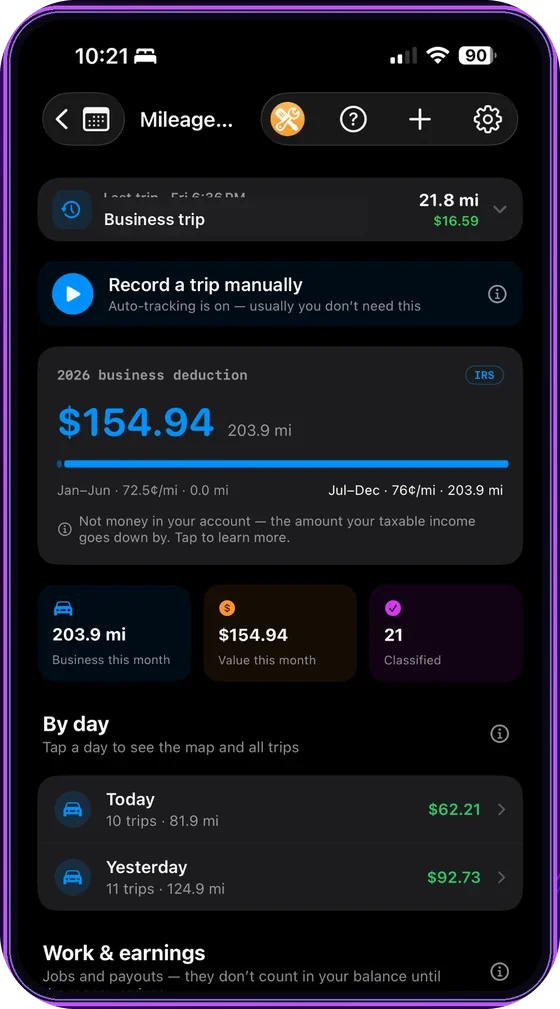
Using VaultHub to simplify tracking
The VaultHub iPhone app automates mileage capture. It detects when you’re moving, logs the GPS route, and lets you tag each trip as Business or Personal with a single tap. The app applies the correct 2026 rate automatically, even handling the mid‑year increase. At any time you can export a CSV or PDF report to attach to your tax filing.
- One‑tap Business/Personal switch – No manual entry of miles.
- Instant deduction totals – See your year‑to‑date deduction value on the dashboard.
- Export‑ready reports – Perfect for Schedule C supporting documents.
You can also try the free 2026 mileage deduction calculator on the VaultHub site to estimate your savings before you file.
What happens if you don’t get a 1099?
Even without a 1099‑K, the IRS receives information returns from Uber and Lyft that report the total payments they made to you. If your return omits that income, the IRS will likely flag the discrepancy. The safest approach is to:
- Gather your own records – Use the VaultHub earnings log, bank statements, or the platform’s driver dashboard to total your rideshare income.
- Enter the amount on Schedule C – Under “Gross receipts or sales.”
- Deduct your expenses – Mileage, phone, water bottles for passengers, and any other ordinary and necessary costs.
Example scenario
- Gross rideshare earnings: $580
- Mileage deduction: $369.50 (as shown above)
- Other expenses: $50 (phone, water, platform fees)
- Net profit: $580 – $369.50 – $50 = $160.50
- Self‑employment tax: 15.3% × 0.9235 × $160.50 ≈ $22.60
- Income tax: Depends on your bracket, but the deduction lowers the taxable amount.
Even with low earnings, the deduction can wipe out most of the tax liability.
When a 1099‑K might appear
Uber and Lyft issue a 1099‑K when both of the following are met: - You earned $600 or more in a calendar year and - You had more than 200 transactions (rides or deliveries).
If you’re under the $600 threshold but have over 200 trips, you still won’t receive the form because the dollar test isn’t met. Conversely, if you earn $700 but have only 150 trips, you’ll get a 1099‑K.
Common pitfalls for low‑earning drivers
- Assuming “no form, no tax.” The IRS expects all income, regardless of documentation.
- Missing mileage logs – Hand‑written logs are okay, but they must be contemporaneous and detailed.
- Mixing personal and business miles – Only miles driven between rides, to pick up passengers, or to a next gig location count as business. Driving from home to a regular workplace is considered commuting and is not deductible.
- Neglecting self‑employment tax – Even a small net profit triggers the 15.3% tax on 92.35% of that profit.
Next steps for drivers under $600
- Collect every payment record – Use VaultHub’s shift mode to capture online/offline times and earnings per platform.
- Log every business mile – Let VaultHub do the heavy lifting; double‑check any manual entries.
- Run the mileage calculator – Estimate your deduction before you file.
- File Schedule C – Report gross receipts, deductions, and net profit.
- Consider a tax professional – If you have other income streams or complex expenses, a CPA can ensure you’re maximizing deductions.
Consider a rideshare driver who earns $580 over several weeks of occasional driving. If they document 500 eligible business miles, their mileage deduction alone could reach $369.50 under the 2026 IRS rates. After another $50 in eligible expenses, their net business profit would fall to just $160.50.
This example shows why tracking mileage matters even for part-time drivers. Small trips can add up to meaningful deductions, and accurate records help drivers avoid paying tax on more profit than they actually earned.
Bottom line
- No 1099‑K if you earned under $600 on Uber or Lyft.
- You still must report the income on Schedule C.
- Mileage deductions (72.5¢/mi Jan‑Jun, 76¢/mi Jul‑Dec) can dramatically reduce taxable profit.
- Self‑employment tax applies to net earnings, but deductions lower the base.
- Tools like VaultHub make tracking effortless and help you stay audit‑ready.
Stay organized, claim every eligible deduction, and you’ll keep more of what you earn – even when the numbers look small.
Quick FAQ
- Do I need to file a tax return if I earned less than $600? Yes, any self‑employment income over $400 triggers a filing requirement for Schedule C and self‑employment tax.
- Can I deduct gas separately if I use the standard mileage rate? No. The mileage rate already includes gas, insurance, depreciation, and repairs. You can only deduct parking fees and tolls on top of the rate.
- What if I use a rental car for rideshare work? You may deduct the actual expenses (rental fee, fuel, insurance) or use the mileage rate if you own the vehicle. Choose the method in the first year you use the car for business.
- Are platform fees deductible? Yes, any fees charged by Uber, Lyft, DoorDash, etc., are ordinary and necessary business expenses.
- Do I need to keep receipts for mileage? Not for the mileage itself if you use the standard rate, but you should keep the mileage log and any receipts for parking, tolls, and other out‑of‑pocket costs.
Track every business mile automatically
VaultHub logs your drives with GPS and applies the IRS rate for each trip's date. Estimate your deduction or get the app.
Sources
- IRS standard mileage rates
- IRS Topic 510, Business use of car
- IRS Publication 463, Travel, Gift, and Car Expenses
- IRS Self‑employment tax
General information, not tax advice. Rules can depend on your situation — check with a tax professional.