
GPS Tracker Mileage Log IRS Compliance Guide
By Egor · Updated · 5 min read · Field technicians

To keep an automatic GPS mileage log IRS-compliant, your app must capture the date, exact mileage, starting and ending locations, and business purpose for every trip at or near the time it happens. While GPS sensors record the drive automatically, you must categorize each trip as business or personal and document why the drive took place.
If you drive between customer service calls as an independent contractor, an automatic GPS tracker saves hours of typing. However, a map recording alone does not automatically make your logs audit-proof. The IRS sets strict standards for what counts as an acceptable record.
Here is how to combine automatic GPS tracking with basic recordkeeping so your tax deductions hold up under IRS scrutiny.
What the IRS Requires for a Valid Mileage Log
Under IRS rules (specifically Publication 463), an acceptable mileage record must be recorded "at or near the time of the trip." Your log needs four key details for every business drive:
- Date of the trip.
- Total mileage driven.
- Destination or location (starting and ending points).
- Business purpose (such as "appliance repair at client site" or "service call").
Automatic tracking handles dates, start/end locations, and miles. Your main responsibility is classifying the drive and adding the business reason.
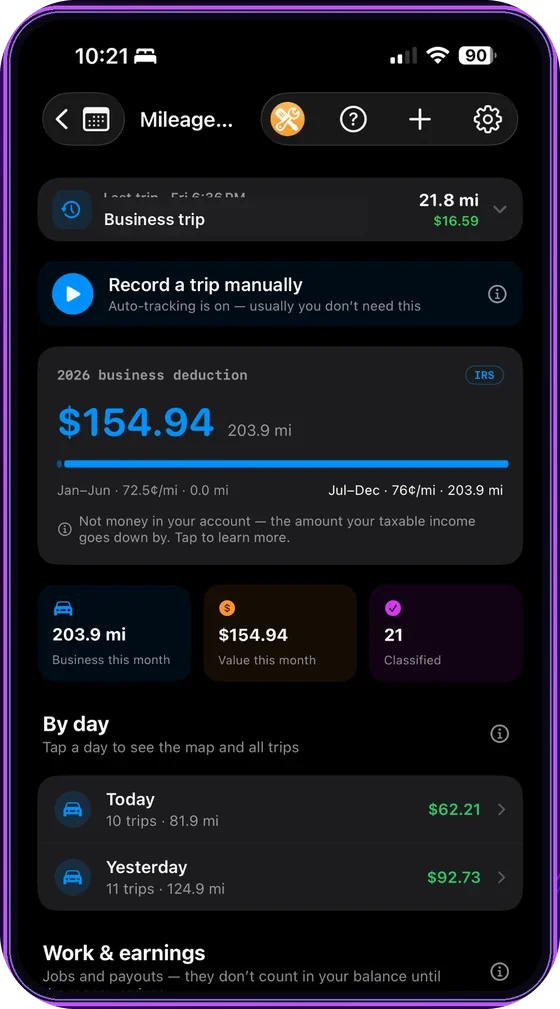
Step-by-Step: Keeping Automatic GPS Logs IRS-Compliant
1. Separate Commuting from Business Driving
Driving from your home to your first regular work site—or coming home from your last stop—is generally classified as a non-deductible commute. Driving between work locations during the day is deductible business travel.
- Example: Driving 10 miles from home to your first HVAC repair stop is a commute (0 deductible miles). Driving 15 miles from Customer A to Customer B is business. If you drive 10 miles back home at the end of the day, that final leg is also a commute.
2. Categorize and Detail Trips Regularly
A GPS tracker will capture motion, but it cannot guess why you drove to a specific neighborhood. Make it a daily habit to review auto-detected routes.
Using an app like VaultHub, which uses motion sensors to log drives and auto-stop when parked, allows you to assign a business tag and quick job note with a single tap. Doing this daily ensures your records are created "at or near the time of the trip" as required by tax guidelines.
From the Road — Make Mileage Review a Daily Habit
As a field service technician working with coax and fiber in the Dallas area, I know how quickly multiple service calls can turn into dozens of miles of driving.
When you're moving between customer locations throughout the day, manually recording every trip is simply inconvenient.
My recommendation is to spend a few minutes at the end of each workday reviewing automatically recorded trips, separating business and personal mileage, and adding relevant job notes while the details are still fresh.
This is exactly the workflow VaultHub was designed to simplify. Automatic tracking handles the driving records, while you stay in control of trip classification and business details.
A few minutes of organization today can save hours of paperwork during tax season.
— Yehor Yurchenko, Field Service Technician & VaultHub Developer
3. Account for Mid-Year IRS Rate Changes
The IRS sets a standard mileage rate that reflects fuel prices, wear and tear, and maintenance. Sometimes these rates change mid-year.
| Time Period | IRS Standard Business Rate | Notes |
|---|---|---|
| 2025 (Full Year) | 70.0 cents / mile | Standard annual rate |
| 2026 (Jan 1 – Jun 30) | 72.5 cents / mile | Mid-year update |
| 2026 (Jul 1 – Dec 31) | 76.0 cents / mile | Mid-year increase for fuel prices |
If you drive 1,000 business miles in May 2026, your deduction is $725.00 (1,000 × $0.725). If you drive 1,000 miles in August 2026, your deduction rises to $760.00 (1,000 × $0.76).
You can estimate your tax savings using our free mileage deduction calculator. Dedicated apps automatically calculate deductions based on the exact date of each drive.
4. Know What Else You Can Deduct
When using the standard mileage rate, gas, oil changes, vehicle insurance, repairs, and depreciation are already included in the per-mile rate. You cannot write those off separately.
However, parking fees and tolls incurred during business trips are deductible in addition to the standard rate. Keep digital receipts for any bridge tolls or garage fees accrued between service calls.
Why Compliance Matters for 1099 Contractors
For 1099 contractors, mileage deductions reduce your net self-employment income. Self-employment tax is 15.3% applied to 92.35% of your net self-employment earnings. Lowering your net earnings with valid mileage deductions reduces both your income tax and your self-employment tax burden.
Note for W-2 employees: Under federal law, most W-2 employees cannot deduct unreimbursed employee travel expenses on their federal income tax return. If you are a W-2 technician, check with your employer about direct reimbursement programs.
Backing Up Your Records
If the IRS audits your return, printed or digital reports (PDF or CSV) showing complete trip histories serve as official proof. Ensure your GPS app stores records securely.
From the Road — Don't Wait Until Tax Season
One of my recommendations for independent contractors is to treat mileage records like any other important business document.
Instead of waiting until the end of the year, export your mileage reports every month and keep organized copies in a dedicated folder in your private cloud storage.
For example, you could create a folder called "2026 Business Mileage" and save separate PDF and CSV reports for each month.
This gives you an additional backup, makes it easier to review your annual business mileage, and helps you prepare the information your tax professional may need.
VaultHub was built to make this process straightforward, combining automatic mileage tracking, job records, earnings, expenses, and exportable reports in one application.
Good recordkeeping shouldn't become another full-time job.
— Denis, Field Service Technician & VaultHub Developer
VaultHub keeps your data on your iPhone and private iCloud account without requiring bank logins, making it easy to export PDF and CSV logs whenever tax season arrives.
Disclaimer: Tax rules depend on individual circumstances. Consult a qualified tax professional for personal advice regarding your vehicle deductions.
Track every business mile automatically
VaultHub logs your drives with GPS and applies the IRS rate for each trip's date. Estimate your deduction or get the app.
Sources
- IRS standard mileage rates
- IRS Topic 510, Business use of car
- IRS Publication 463, Travel, Gift, and Car Expenses
- IRS Self-employment tax
General information, not tax advice. Rules can depend on your situation — check with a tax professional.